> ## Documentation Index
> Fetch the complete documentation index at: https://docs.aupaircal.com/llms.txt
> Use this file to discover all available pages before exploring further.
# Invite your au pair or another parent
> Bring your family onto the same household calendar.
You need a parent account to invite members.
1. Open **Family Dashboard**.
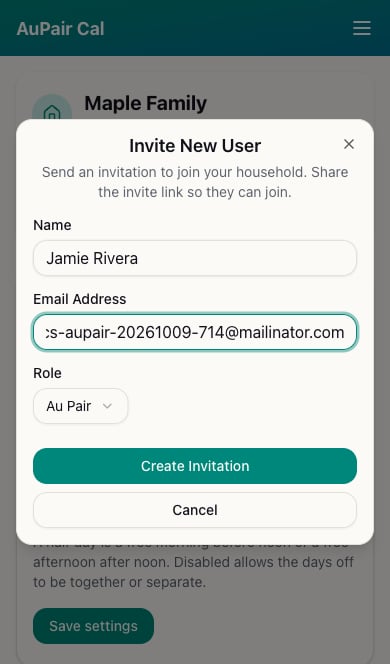
2. Choose **Invite User**.
3. Enter the person's **Name** and **Email Address**.
4. Choose **Au Pair** or **Parent** under **Role**.
5. Choose **Create Invitation**.
6. Share the invitation link from the confirmation screen if needed. The recipient uses it to [join your household](/family/join).
 ## Check that they joined
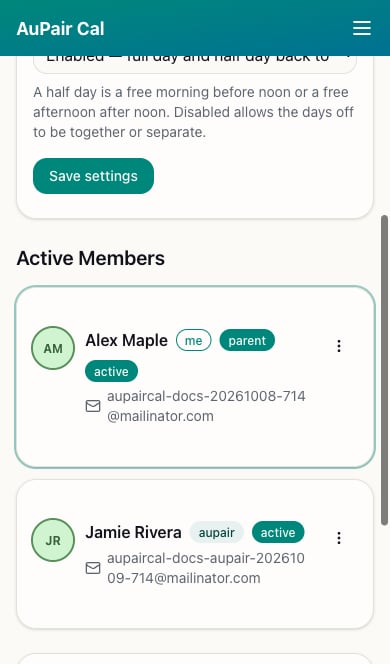
Look for the member's **active** status in Family Dashboard. An invitation alone does not mean they have joined.
## Check that they joined
Look for the member's **active** status in Family Dashboard. An invitation alone does not mean they have joined.
 Treat invitation links as private. Send them only to the person joining your household.
If an au pair slot is already taken, the app may prevent another Au Pair invitation. For errors, see [Trouble signing in or joining](/help/sign-in).
This documentation is built and hosted on [Mintlify](https://mintlify.com), a developer documentation platform.
Treat invitation links as private. Send them only to the person joining your household.
If an au pair slot is already taken, the app may prevent another Au Pair invitation. For errors, see [Trouble signing in or joining](/help/sign-in).
This documentation is built and hosted on [Mintlify](https://mintlify.com), a developer documentation platform.